Hey, Reader! Itโ€™s Olena here. Apple announced the upcoming Apple Watch update at the annual WWDC event that took place on June 9. The upcoming software update, called watchOS 26, brings lots of Apple Intelligence features to your wrist and introduces lots of practical features that will make you want to use your watch more than ever before!
This Newsletter is Brought to You By:
Incogni Logo
On The Watch โŒš
Everything Apple Watch: Tips, News, Deep Dives, Apps & Gear

Editor's Note

Hey, Reader! Itโ€™s Olena here.

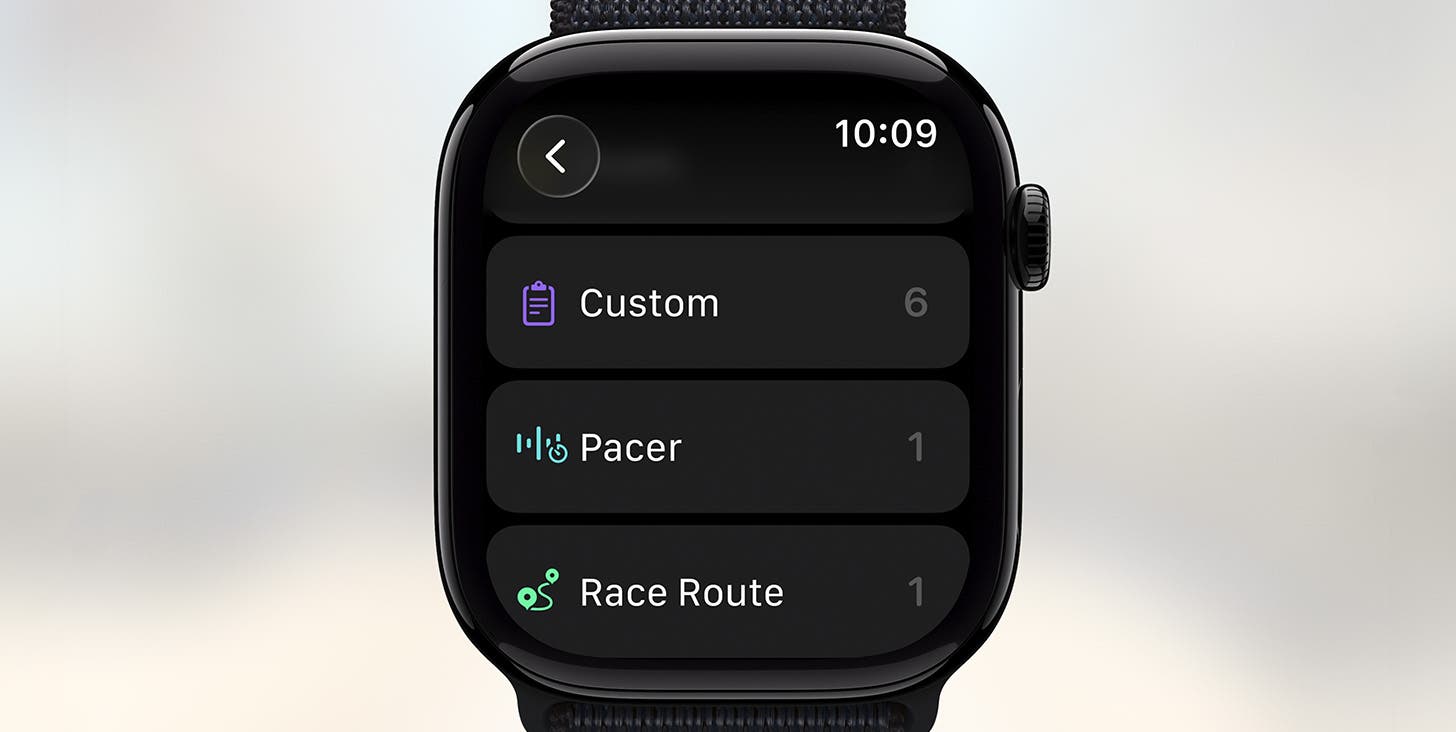
Apple announced the upcoming Apple Watch update at the annual WWDC event that took place on June 9. The upcoming software update, called watchOS 26, brings lots of Apple Intelligence features to your wrist and introduces lots of practical features that will make you want to use your watch more than ever before!

If you want to learn more about your watch, join our free Apple Watch class on June 17 at 4:30 p.m. ET. I will be there to moderate! Scroll down to learn more about the class.

Happy Reading!

Olena Kagui's picture
Olena Kagui,
On the Watch Editor at iPhone Life

PS. Missed our Apple Watch hidden gems edition? Read it here to get Apple Watch tips you didnโ€™t even know you needed!

IN THIS EDITION

  • Tips - Why you should monitor your nighttime breathing. ๐ŸŒ™
  • Trivia - How loud is too loud for your health? ๐Ÿ”ˆ
  • Deep Dive - Apple Intelligence features coming to watchOS 26! ๐Ÿค–
  • Reader Questions - How to get a complication back on your watch face โŒš
  • Health Challenge Update - You can still join the June Challenge! ๐Ÿ†
  • Fun and Interesting Tidbits - How can pets benefit from Apple products? ๐Ÿถ
๐Ÿ”ฅ๐Ÿคฏ APPLE WATCH TIPS

๐Ÿ˜ด Track your breathing for healthier sleeping habits.

๐Ÿ“ Share your location directly from your wrist.

๐Ÿ˜ฎโ€๐Ÿ’จ Get fewer notifications by turning off annoying breathing reminders.

Incogni is the Real Way to Stop Spam: Promo Code IPHONELIFE

Your information is being bought and sold by data brokers on a daily basis, which is how spammers get your email address and phone number. Incogni works to get you off those lists, securing you a quiet phone and online privacy. Sign up today and get 55% off with code IPHONELIFE.

๐Ÿ†๐Ÿ˜Ž Trivia

Quiet down! What is the default decibel level your Apple Watch will notify you of?

  • ๐Ÿ“ฃ 80 decibels
  • ๐Ÿ“ฃ๐Ÿ“ฃ 90 decibels
  • ๐Ÿ“ฃ๐Ÿ“ฃ๐Ÿ“ฃ 100 decibels

๐Ÿ† Did you get it right? Scroll down to find out! ๐Ÿ†

๐ŸŒŠ๐Ÿคฟ DEEP DIVE: Coolest New WatchOS 26 Features

Apple has finally announced all the exciting software updates coming to our wrists this fall! Apple Intelligence features will be making it easier than ever to get a good workout, dismiss notifications with a flick of the wrist, and communicate within the Messages app.

1. Apple Intelligence Will Offer You Better Workouts

One of the biggest new features coming to Apple Watch is Workout Buddy, which uses Apple Intelligence to analyze everything in your Fitness app to offer you a personalized workout experience. Workout Buddy will help motivate you via voice to run that last mile of your five mile run or push harder to match your average pace (or beat it).

Since we all have different preferences, the iPhone Life team has been wondering if Apple will let us customize our preferred tone of coaching since some of us prefer a stricter military-style regime while others benefit from soft-spoken encouragement.

2. Customize Your Workouts Better

The Workout app will also make it easier to customize workouts and make it easier to access your favorite activities just the way you like them. Plus, youโ€™ll be able to pick your soundtrack without having to leave the app, whether you prefer an auto-selected album or your hand-picked podcast.

I am super curious to see how well Apple Intelligence can predict what I like to listen to depending on my workout type. Since itโ€™s drawing from years of experience with me using my devices, I am hoping it knows me even better than I know myself โ€” but weโ€™ll just have to see!

3. Notification Volume Based on Your Environment

Ever had a random Apple Watch notification sound loudly enough to startle you? I haveโ€ฆ Apple Intelligence will soon be able to analyze the sounds in your environment to make notifications quieter or louder to match the volume of whatโ€™s going on around you.

While I usually keep my watch on silent, I have been known to forget to turn on a Focus mode at the worst moment possible and Iโ€™m hoping that this feature will save me from future embarrassment. But I am also worried about Apple Intelligence confusing a loud movie in the cinema with an outdoor music concert and booming as loudly as possible.

4. New Gestures to Dismiss Notifications

Weโ€™ve had lots of fun one-handed gestures to play with on our watches over the years, and now weโ€™ll have a new one! Once we update our watches in the fall, a simple flick of the wrist will dismiss notifications that arenโ€™t time sensitive. This is great because you can do this even if you donโ€™t have a free hand to tap and donโ€™t want to use voice commands in case you are in public.

Get 86% Off iPhone Photography Schoolโ€™s Capture It All Course!

Join expert photographer Clifford Pickett in an entirely online course as he shows you everything your iPhone camera can do. Dive into his adventures while you learn to capture your own. Sign up today for 80% off!

5. Smarter Suggestions & Smart Stacks

With Apple Intelligence coming to the Apple Watch, a lot of features we already use will become smarter. For example, if someone texts you asking where you are, the Messages app will offer up a one-tap option to share your location, saving you time tapping on a bunch of little icons. Smart Stacks will also be better at predicting what you want to see on your watch depending on the time of day, your location, and your routine.

6. More watchOS 26 Updates

There are so many updates coming to Apple Watch, we covered even more in this article on our website. Make sure to check it out if you are curious about live translations in the Messages app and more!

What new watchOS feature are you most excited about? Email OntheWatch@iphonelife.com and let me know!


๐Ÿค”โ“ READER QUESTIONS

You asked and we answered!

Q: When my watch was updated, I lost my timer on the face. How do I get it back? - Candy B

A: Hello Candy, thatโ€™s frustrating but I can help! You can get the Timer back by editing your watch face directly from your Apple Watch by long-pressing the watch face, selecting Edit, navigating to Complications, tapping the node where you wish to place it, and selecting it from your list of apps. Hope that helps!

โœ‰๏ธ Email your questions to OnTheWatch@iPhoneLife.com and we might answer them in a future edition! Questions may be edited for clarity and length.

Tackle Your Credit Card Debt with 0% Interest until Nearly 2027

If you have outstanding credit card debt, getting a new 0% intro APR credit card could help ease the pressure while you pay down your balances. FinanceBuzz credit card experts identified this top credit card that is perfect for anyone looking to pay down debt and not add to it. You can also earn up to 20,000 miles after spending just $500 on purchases in the first three months! Click through to see what all the hype is about.

๐Ÿ‘Ÿ๐Ÿ’ช iPhone Life Health ๐Ÿ‘ŸChallenge Update

Our June Challenge is in full swing but you can still join until June 22! As long as youโ€™ve worn your Apple Watch, the Challenges app will give you points for all the exercises youโ€™ve already done this month. The monthly iPhone Life Challenge is a great way to come together as a community and motivate each other to reach our health goals by staying active. Weโ€™ll be doing a weekly accountability post for subscribers in our Facebook group to share struggles and tips and support each other on our journeys.

To join the challenge, download the free Challenges app on your iPhone and enter the code 9R2Q when prompted. Need help? This article explains the steps and tells you more about the app.

The top 20 users of the May challenge are:

1. Mary - 3,017 pts
2. Bobby O - 2,967 pts
3. Peter - 2,956 pts
4. rmele - 2,578 pts
5. Bonnie H - 2,375 pts
6. jeshortmd - 2,241 pts
7. Tim Miller - 2,218 pts
8. charliedornblos - 2,197 pts
9. mjboulder89 - 1,983 pts
10. henshaw44 - 1,981 pts
11. gigogal - 1,793 pts
12. Keith M - 1,600 pts
13. jill.ferns - 1,526 pts
14. margieplough - 1,499 pts
15. oilier-breed.1e - 1,354 pts
16. Austin Durr - 1,277 pts
17. Amy Spitzfaden-Both - 1,173 pts
18. Sarah Kingsbury - 1,101 pts
19. Tracy mac - 970 pts
20. fdonaldaddis - 755 pts

Are you enjoying the challenge? Do you have any suggestions for how we can make it even better? Email OntheWatch@iphonelife.com and let me know.

๐Ÿฅ‡ CHECK YOUR TRIVIA ANSWER ๐Ÿฅ‡

The correct answer is: ๐Ÿ“ฃ๐Ÿ“ฃ 90 decibels

You can set your own limit between 80 and 100 but the default is 90.

๐Ÿ•บ๐Ÿ“ฐ OTHER FUN AND USEFUL TIDBITS

๐Ÿ… PREMIUM CONTENT

If you enjoyed this newsletter, youโ€™ll love our free live Apple Watch Class on iPhone Life Insider!

Our wildly popular live online Apple Watch Free Class is back to teach you the latest updates, improvements, and can't-miss features. In this free class you will learn how to:

  • Easily navigate your Apple Watch so you can find exactly what you want every time.
  • Master the Control Center, Smart Stacks, and App Switcher.
  • Customize your watch face so it only displays the information you care about.
  • Use the Top 5 advanced Apple Watch features you should be using.

Reserve your spot in our free Apple Watch Class on June 17 at 4:30 p.m. ET

FIRST TIME READING?

Sign up here to get the On the Watch newsletter in your inbox every other week.

โ€Š
More from our sponsors

Follow iPhone Life

iPhoneLife Logo
Copyright ยฉ 2025 Mango Life Media LLC. All Rights Reserved.
Mac, iPad, iPhone, Apple TV, Apple Watch, AirPods, macOS, iPadOS, iOS, watchOS, and Apple are all trademarks of Apple, Inc.
You have opted in to receive this email from iPhone Life magazine
To stop receiving these emails, you may:
Mango Life Media LLC | 2280 W Tyler Ave Suite 205 | Fairfield, IA 52556