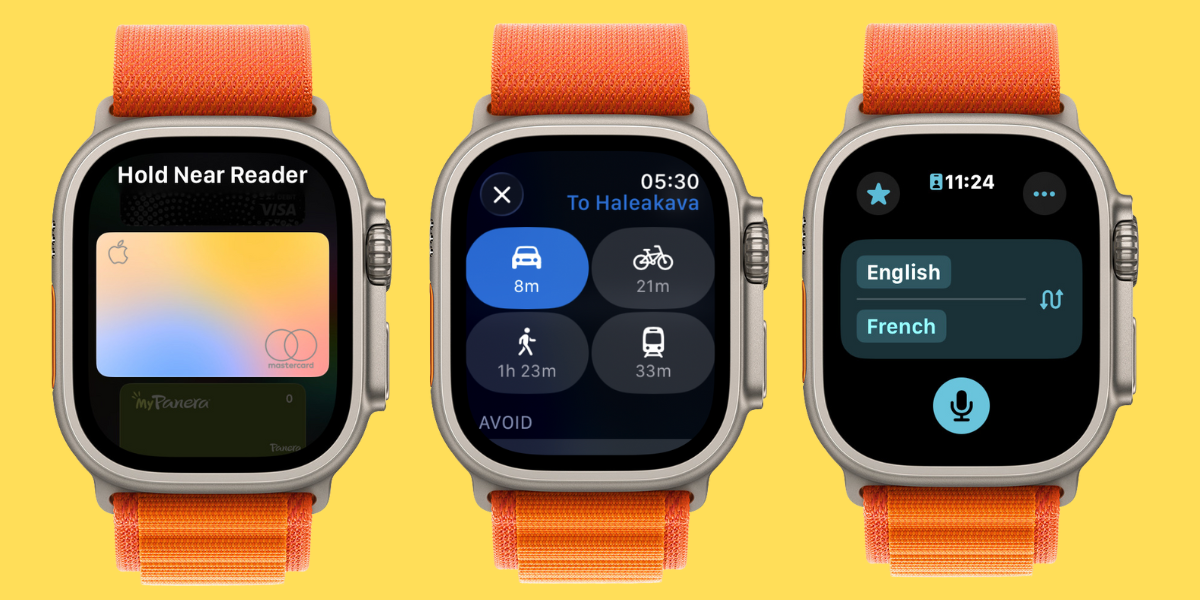
Hey, Insider! It’s Olena here. Are you going on a trip? Or even just a walk around the block? Your Apple Watch can guide your way, store your money and tickets, translate between languages, and even help you take the perfect touristy selfie!
iPhoneLife Logo
On The Watch ⌚
Everything Apple Watch: Tips, News, Deep Dives, Apps & Gear

Editor's Note

Hey, Insider! It’s Olena here.

Are you going on a trip? Or even just a walk around the block? Your Apple Watch can guide your way, store your money and tickets, translate between languages, and even help you take the perfect touristy selfie!

Happy Reading!

Olena Kagui's picture
Olena Kagui,
On the Watch Editor at iPhone Life
IN THIS EDITION

  • Tips - The quickest way to answer a call on your watch 📱
  • Trivia - Which popular travel app is compatible with Apple Watch? 🏨
  • Deep Dive - How to use your Apple Watch for smoother travel. ✈️
  • Health Challenge Update - Our August Challenge is around the corner! 🏆
  • Fun and Interesting Tidbits - Device leaks, lawsuits, and new emojis. 🎉
🔥🤯 APPLE WATCH TIPS

📱 Answer calls with a one-handed gesture.

🍎 The easy way to track your health data.

🤫 Turn off call notifications on your watch.

🏆😎 Trivia

If you’re enjoying some summer travel, you might want to quickly browse restaurants or nearby hotels without reaching into your bag and pulling out your phone. Which of these major apps can you use on your Apple Watch?

  • ⭐Yelp
  • ⭐⭐ OpenTable
  • ⭐⭐⭐ Trip Advisor
  • ⭐⭐⭐⭐ All of the above

🏆 Did you get it right? Scroll down to find out! 🏆

🌊🤿 DEEP DIVE: Apple Watch: The Travel Buddy You Didn’t Know You Needed

Your Apple Watch can make traveling easier — whether you are strolling through your neighborhood or traveling abroad to another continent. We’ll teach you how to use your watch for navigating, paying, translating, and even taking photos!

1. Get Vibrating Directions on Your Wrist

Did you know that you can see Maps directions on your watch? It will even vibrate whenever it’s time for you to make a turn! This isn’t just convenient, but it might be safer too. I recently took a self defense class where the instructor pointed out that looking at your phone not only distracts you, but makes you look like an easier target for opportunistic criminals.

2. Get Public Transit Directions on Your Watch

The Maps app isn’t just good for driving and walking directions, it can help you take the bus, subway, or the public transportation option of your choice. Not only will it give you the precise transit directions, you can even store your transit cards on your watch.

3. Store Cards, Tickets & More In Your Digital Wallet

Another great thing about your Apple Watch is that it almost replaces your physical wallet. It not only stores Apple Cash, credit cards, and certain transit cards, but it can also keep track of your boarding passes, hotel keycards, and even concert/event tickets — sometimes including directions on how to park, get to your seat, etc. Once watchOS 26 comes out this fall, U.S. citizens will even be able to have their passport in their Apple Wallet!

4. Translate on the Go

If you’re traveling abroad or run into someone who speaks a different language, your Apple Watch can make communicating with them easy. The Translation app works great on your watch, and if you have an Ultra model, it can even be the default for the Action Button. Once you update to watchOS 26 this fall, you’ll also be able to use the Live Translation feature within the Messages app.

5. Take the Perfect Selfie or Groupie

Your watch has a built-in remote to your Camera app on your iPhone. This means that you can set up your phone, pose, and use your watch to capture the shot you want—you can even see what your iPhone sees from your wrist! This is great if you feel uncomfortable asking someone else to take your picture, or if you are alone or want a group pic without leaving anyone out. It is common for your watch screen to be black when you first open the Camera app. Try closing it and trying again or restart your devices to fix this glitch.

What is your favorite Apple Watch travel tip? Or do you have one that I missed? Email OntheWatch@iphonelife.com and let me know!


👟💪 iPhone Life Health 👟Challenge Update

Our August Challenge will be starting soon! You can already sign up so that you don’t forget! The monthly iPhone Life Challenge is a great way to come together as a community and motivate each other to reach our health goals by staying active. We’ll be doing a weekly accountability post for premium subscribers in our Insider Facebook group to share struggles and tips and support each other on our journeys.

To join the challenge, download the free Challenges app on your iPhone and enter the code WM4E when prompted. Need help? This article explains the steps and tells you more about the app.

Are you enjoying the challenge? Do you have any suggestions for how we can make it even better? Email OntheWatch@iphonelife.com and let me know.

🥇 CHECK YOUR TRIVIA ANSWER 🥇

The correct answer is: ⭐⭐⭐⭐ All of the above

The Watch versions of these apps do have some limitations — for example, on Yelp you can view reviews but not leave them — but being able to launch them on your wrist not only saves time but can also help keep your valuables safe by keeping your bag closed and your phone inside.

🕺📰 OTHER FUN AND USEFUL TIDBITS

Missed the most recent editions? Now you can go back and read them!

FIRST TIME READING?

Sign up here to get the On the Watch newsletter in your inbox every other week.

Follow iPhone Life

iPhoneLife Logo
Copyright © 2025 Mango Life Media LLC. All Rights Reserved.
Mac, iPad, iPhone, Apple TV, Apple Watch, AirPods, macOS, iPadOS, iOS, watchOS, and Apple are all trademarks of Apple, Inc.
You have opted in to receive this email from iPhone Life magazine: Insider Daily Email
To stop receiving these emails, you may:
Mango Life Media LLC | 2280 W Tyler Ave Suite 205 | Fairfield, IA 52556