Hey, Insider! The way you charge your watch can make or break your Apple Watch experience. That’s why I’m here to give you tips on when and how to charge to protect your battery health and get the most out of your watch. I’ll also give you tips on a few settings you can tweak to improve battery life, so you can spend less time charging.
iPhoneLife Logo
On The Watch ⌚
Everything Apple Watch: Tips, News, Deep Dives, Apps & Gear

Editor's Note

Hey, Insider! It’s Olena here.

The way you charge your watch can make or break your Apple Watch experience. That’s why I’m here to give you tips on when and how to charge to protect your battery health and get the most out of your watch. I’ll also give you tips on a few settings you can tweak to improve battery life, so you can spend less time charging.

Happy Reading!

Olena Kagui's picture
Olena Kagui,
On the Watch Editor at iPhone Life
IN THIS EDITION

  • Tips - Take phone photos with your watch 📸
  • Trivia - What is watchOS 26’s new look called? ⌚
  • Deep Dive - Improve your Apple Watch battery. 🔋
  • Health Challenge Update - Join our November Challenge today! 🏆
  • Fun and Interesting Tidbits - AirTags save the day. 👮
🔥🤯 APPLE WATCH TIPS

🛏️ A new way to understand sleep quality.

🧍 Turn off the annoying stand reminders.

📸 Use your watch as a camera remote.

🏆😎 It’s trivia time!

You might have noticed your watch display looks a bit different since you updated to watchOS 26. What is this new transparent aesthetic called?

  • 🔎 Apple Glass
  • 🔎🔎 Solid Glass
  • 🔎🔎🔎 Liquid Glass

🏆 Did you get it right? Scroll down to find out! 🏆

🌊🤿 DEEP DIVE: Quick Tips for Longer Battery Life

Although it was recently dethroned, the Apple Watch was the most popular watch in the world for many years, despite one major flaw—a short battery life. I’ll teach you how a few changes in habits and settings can improve your battery life and upgrade your overall Apple Watch experience.

1. Average Apple Watch Battery Life

The newest Apple Watch 11 got a battery boost and lasts up to 24 hours, and the Apple Watch Ultra models can last 42 hours or longer with Low Battery mode. However, most models last around 18 hours on average, and certain features and habits will shorten battery life over time.

2. When Should You Charge Your Watch?

Most of us charge our phones overnight, but that isn’t the best practice for an Apple Watch. Firstly, Apple claims that keeping your watch plugged in after it is charged can damage battery life in the long run. Secondly, not sleeping in your watch makes you miss out on all of the amazing sleep-tracking features that offer important insight into your overall health. I recommend charging your Apple Watch first thing in the morning while you are drinking your coffee/tea or taking a shower. If you need to charge your watch twice a day, which I sometimes do if I use it more than usual, I’ll charge it right before bed while I brush my teeth and read. If you have an Apple Watch Series 7 or newer, make sure you take advantage of fast charging and charging reminders, which I will cover next.

3. Fast Charging & Charging Reminders

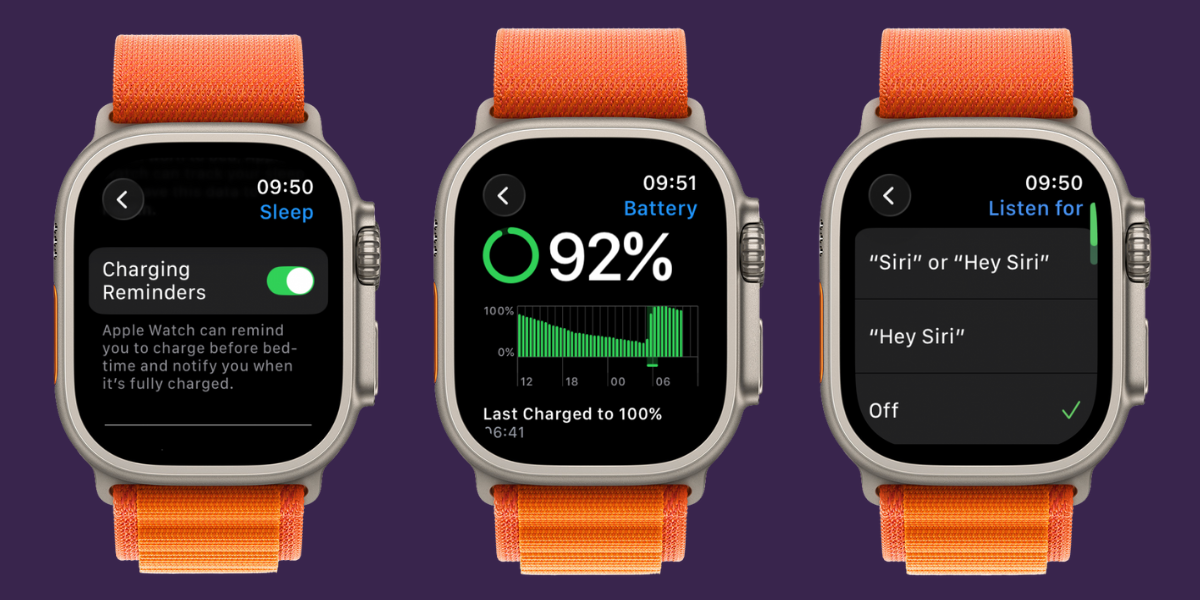
The newer your Apple Watch model, the quicker it charges, with the newest Series 11 charging from 0-80% in just half an hour. This also means that you can charge enough for sleep tracking in 10 minutes or less. To make the most of fast charging, use an official Apple Watch charger and turn on Charging Reminders in your Settings. Charging Reminders will let you know if you don’t have enough battery to last the night, and you’ll get a notification that your watch is done charging. To enable this feature, open the Watch app on your iPhone, scroll down and tap on Sleep, then toggle on Charging Reminders.

4. Tweak Settings for Better Battery Life

Some Apple Watch features are big battery drainers. Toggling off Listen for “Hey Siri” and Environmental Noise Monitoring can be a big help. But you should also keep your watch running the latest software, delete apps you don’t use, limit notifications you receive on your watch, and turn off automatic downloads. All of these tweaks can make a big difference, too!

When is your favorite time to charge your watch, and what have you tried to extend your battery life? Email OntheWatch@iphonelife.com and let me know!


👟💪 iPhone Life Health 👟 Challenge Update

Our November Challenge is here! The free Challenges app will give you points for all the exercises you’ve recorded via the Workouts app this month. The monthly iPhone Life Challenge is a great way to come together as a community and motivate each other to reach our health goals by staying active. We’ll be doing a weekly accountability post for premium subscribers in our Insider Facebook group to share struggles, trade tips, and support each other on our journeys.

To join the challenge, download the free Challenges app on your iPhone and enter the code TX7R when prompted. Need help? This article explains the steps and tells you more about the app.

Are you enjoying the challenge? Do you have any suggestions for how we can make it even better? Email OntheWatch@iphonelife.com and let me know.

🥇 CHECK YOUR TRIVIA ANSWER 🥇

The correct answer is: 🔎🔎🔎 Liquid Glass

This glass-like design is the new look for all your devices as soon as you update to OS 26. Do you love it, hate it, or did you not even notice? Let us know!

🕺📰 OTHER FUN AND USEFUL TIDBITS

Missed the most recent editions? Now you can go back and read them!

FIRST TIME READING?

Sign up here to get the On the Watch newsletter in your inbox every other week.

Follow iPhone Life

iPhoneLife Logo
Copyright © 2025 Mango Life Media LLC. All Rights Reserved.
Mac, iPad, iPhone, Apple TV, Apple Watch, AirPods, macOS, iPadOS, iOS, watchOS, and Apple are all trademarks of Apple, Inc.
You have opted in to receive this email from iPhone Life magazine: Insider Daily Email
To stop receiving these emails, you may:
Mango Life Media LLC | 2280 W Tyler Ave Suite 205 | Fairfield, IA 52556